QR-Codes win mostly

QR-Codes win, mostly.


Transport Triest

www.Triest.Tel


Saturday, 18 December 2010

How to make a unique QR-ironed T-shirt?


How to make a unique QR-ironed T-shirt?


You will need to have QR T-shirt package from Kitchen Budapest for making a KIBU styled QR T-shirt. If you don't have one, and are interested in or you would like to have a QR Code T-Shirt please send us an email for this address: qrt-shirt@kitchenbudapest.hu.

Besides our QR T-shirt package, you will need an iron, an iron-table, and a tracing paper to continue.

You can generate your QR code for example using the free service on qrcode.kaywa.com. Please check what is the size of your sample QR code sticker - is should be 21x21 or 25x25 matrix. This is important to know, because you have to use a specific lengt of text to target a specific size of QR code while encoding.

(To read the QR code you will need to install decoder application to your computer or mobile device. You can find help on our T-shirt message project page under "Resources".)

For example, to generate a 25x25 pixel QR code you have to use a text containing more than 11 but less than 20 letters.

Here is a help:

21x21 QR code: 0-11 letters
25x25 QR code: 11-20 letters

a.) If you managed to generate your QR code, the next step is that you will have to reproduce it manually to have an ironable sticker.

Now you have to use the QR code sample sticker found in your package, and remove the exra pixels from it. Be careful, for you will remove pixels form the back side of the sticker, you have to think mirrored. You also have to take care to remove pixels from the white areas of the QR code.

QR code experiments

One strategy to avoid mistakes to print the QR code mirrored and remove the pixels while keeping one eye on the print.

Even better strategy is to print the QR code in the same size as the sticker, then temporary fasten the print to the sticker by tapes, and then use a pin to punch the white areas systematically to make visible holes on the sticker sheet. After doing this you can easily remove the punched parts from the sheet.

Don't trouble if you made a couple of mistakes - the QR decoders can handle some errors in the code.

b.) If you have your QR sticker you have to transfer on the T-shirt by ironing it. You will have to follow these instructions for best result:


1. Put the sticker sheet onto the T-shirt with the plastic glossy side up.

2. Put a sheet of tracing paper or fabric on the top of the transfer sheet to avoid the iron being contacted directly with the plastic side of the transfer sheet.

3. Iron it for 15-20 second by 160°C degrees with an average pressure on the sheet.

4. Wait for a couple of minutes for the sheet to get cold.

5. Remove the plastic film of the transfer sheet.
Your T-shirt you made in this way is durable and washable
at a maximum of 60°C degrees.


6. You are ready... smile and wear it!

Last step: customise your geek avatar!

Using the spare black pixels you removed from the transfer sheet you can customise the "geek" avatar printed on the T-shirt. For a basic idea you can make a feminin or masculin character as you can see on the picture below.


Or you can use your creativity at this part - just place the black pixel remains anywhere you want - to make hair, mouth, nose or shoes for the avatar - put a piece of tracing paper onto it and iron it!


Source:
http://www.kitchenbudapest.hu/en/howto_make_qrcode_tshirt

A Little Bit Of QR Code Colour Loving For Dot Tel Domains


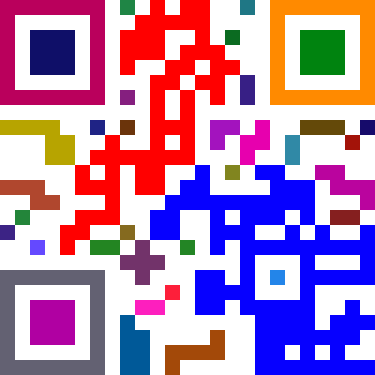
Others have noted that if you have enough contrast between foreground and background, most readers will still recognise the code – but lets make every block a different colour! Yup, it still works! Its a lot more prettier and fancier, but a thing to note is that you should still use colours that are a high contrast to the background. I guess I could have used a pale yellow instead of a white background to add more…but that’ll be just over doing it.

Source: http://www.madox.net/blog/2009/06/18/a-little-bit-of-qr-code-colour-loving/

Ok:
So let me make a test with my own code, for www.Triest.Tel:

qrcode


GIMP Image Editor

1.)
Werkzeuge
Auswahlwerkzeuge
Rechteckige Auswahl

2.)
Bild
Modus
RGB

3.)
Rechter Mouse Klick
Auswahl
Nach Farbe
Bearbeiten
Mit VG Farbe Füllen
VG/HG Farbe


First Results:


4.)
Auswahl
Auswahleditor
Auswahl
Invertieren
Mit VG Farbe Füllen
Werkzeuge
Auswahlwerkzeuge
Rechteckige Auswahl


5.)
Kanäle
Rot
(RGB, 2 Ebenen)


6.)
Malwerkzeuge
Füllen


Mobile Marketing: Weitere Überlegungen


Nun habe ich:
1.) Webseitennamen kreirt und diese registriert, und mit Inhalten gefüllt.

2.) Mich mit Suchmaschinenoptimierung ausseinandergesetzt (SEO) und damit experimentiert.

3.) Des Weiteren, mich mit Mobile Marketing beschäftigt.

4.) Und wie man QR- (Quick Response) Codes überall einsetzen kann.

Jetzt wäre es doch an der Zeit, offline zu gehen: Visitenkarten mit Webadressen und QR-Codes zum Scannen drucken und verteilen.

Einige grossformatige QR-Codes in Schaufenstern, auf Autos, Fahrräder und Tee-Shirts zeigen.

Denn QR-Codes können Informationen wie Kontaktinfo oder Text enthalten (Werbebotschaften, oder auch politische Wahlbroschüren, etc.), oder auf Produktepackungen Angaben zum Inhalt und Produkt machen.

Um Ihre Botschaften in Codes zu verpacken, brauchen Sie einen Code-Generator, diese finden Sie online, bei diversen Anbietern. Dort geben sie einfach den Link Ihrer Webseite ein, oder Ihre sonstigen Kontaktinfos, wie Telefonnummern, Email-Adressen, etc., damit man Ihre Info schnell mit dem Handy (Mobile Phone / iPhone) einscannen und einlesen kann.

Falls Sie bunte Codes haben möchten: Achten Sie immer darauf, dass der Code genügend Kontrast zum Hintergrund hat.

Das Einlesen von QR-Codes ist die schnellste, direkteste und einfachste Art, wie Jemand Etwas über Sie und Ihre Produkte / Firma erfahren kann.

Durch Bereitstellung eines Codes zur rechten Zeit, am richtigen Ort, erreichen Sie Menschen einfacher und schneller, wie wenn Sie nun darauf warten würden, bis diese Menschen allenfalls Ihre Webseite im Internet entdecken. Führen Sie die Leute hin, zu Ihrer Webpräsenz: Von Offline zu Online. Und Online, kann wieder zu Offline-Kontakten führen, wenn Sie einen Verkaufsladen, eine Organisation, etc. haben, die von Kundenbesuchen, Mund zu Mund Propaganda, und von ihrem Bekanntheitsgrad lebt.

Ihre Landingpage im Web, soll die Besucher erst einmal informieren und einladen, mit Ihnen Kontakt aufzunehmen, Ihnen Etwas abzukaufen, und zu guter Letzt, Sie und Ihre Firma weiterzuempfehlen.

Vor nicht allzulanger Zeit, publizierten Werbeplakate nebst der Botschaft des Werbers seine Geschäftsadresse, oder / und seine Webadresse.

Heute kommt es noch besser: Da braucht man sich nichts zu notieren oder zu merken: Schnell QR-Code einscannen und später, in aller Ruhe lesen und studieren. Oder gleich unterwegs kurz einen Blick auf die Botschaft werfen, auf dem Handy-Display. Nur sollte das nicht beim Autofahren oder Gehen in der Fussgängerzone geschehen, sondern dort, wo Sie eine Pause einlegen, und es sich bequem gemacht haben. Auf einer Sitzbank, oder im Tram, Zug, Taxi, etc.. Oder noch besser: Zu Hause auf dem Sofa, anstatt das "Pantoffel-Kino" einzuschalten. (Werbe-Botschaften) brauchen Ihre Zeit und Aufmerksamkeit. Nicht nur Fernseh-Werbespots können unterhalten, sondern auch gut aufgemachte Webseiten. Viel Spass. Und lernen Sie viel Gutes und Nützliches. Ich glaube, dass auch die Werbe-Auftraggeber und Werbe-Agenturen eingesehen haben, dass Volksverblödung, Brainwashing, etc., nicht der alleinige Garant für höhere Verkaufs- und Umsatzzahlen sind. Die Konsumenten sind nicht (alle) blöd, und möchten das auch verstanden wissen, durch etwas anspruchsvollere und interessante Werbung, die auch vermittelt, dass die Firma / der Werber sich verantwortlich gibt, und dem Nachhaltigkeit kein Fremdwort ist. Denn nachhaltige und umweltschonende Produkte können auch Teil der Eigenschaften sein, welche die Nachfrage beinhaltet. Es wird gerade diese Art von Werbung sein, die beim Kunden ankommt, und seine Konsumwünsche befriedigen kann.

Ehrliche und gute Produkte, werden siegen. Kunden-Verarsche is out. Denn mittlerweile können sich die Konsumenten besser und umfangreicher über den Markt und seine Angebote und Produkte informieren. Auch mobile, "on the go" / unterwegs.

Das Mobile Marketing trifft auf Menschen die mobil sind, und das Internet vermehrt auch mobil benutzen. "Um sehen und gesehen zu werden". Also, um Etwas über Sie und Ihre Firma zu erfahren, oder um sich selber darzustellen und zu zeigen. Bestehende Netzwerke helfen, Botschaften zu verbreiten. "Share" (Teile), Dies und Das, geht nirgendswo einfacher und schneller.
Twitter ist beliebt, und respektiert die Tatsache, dass Ihre Zeit kostbar ist, und sie nicht (unbedingt) Stunden und Tage im Internet verbringen möchten.

Zum Schluss bleibt dann doch noch die Frage, wo die besseren Angebot zu Finden sind: Unterwegs, in Zeitungen, oder online im Internet.

Das Internet bietet den Vorteil, dass man konzentriert und gezielt nach infos Suchen kann.
Wenn sie jedoch Google Search nicht vollumfänglich verstehen und nutzen können, kommen Sie wohlmöglich zu kurz, und es entgehen Ihnen interessante Infos und Angebote.
Eine Vertrautheit in der Bedienung der Suchmaschinen ist deshalb von grossem Vorteil, wenn Sie anstatt der vielen veralteten Botschaft, auch ganz aktuelle "herausfischen" wollen.
Dafür gibt es am linken Rand Ihres Bildschirmes weitere Such-Optionen, die man nutzen sollte.

Zwar indexiert Google neue Inhalte und Seiten sehr schnell, nur dauert es sehr lange, bis diese allenfalls nach "Vorne" gefunden haben. Das zurückblättern, können Sie sich ersparen, wenn Sie nach den neuesten Nachrichten suchen, indem Sie diese Suche gezielt eingeben:


Method 1:
Google Search
-> Web
--> Everything
---> More search tools
----> Select from:
Latest
Past 24 hours
Past week

Method 2:
Google Search
-> Web
--> Blogs
---> More search tools
----> Select from:
Latest
Past 24 hours
Past week

Method 3:
Google Search
-> Web
--> Updates
---> More search tools
----> Select from:
Latest
Past 24 hours
Past week

.

Thursday, 16 December 2010

Create QR-Codes to read, use and share mobile web content


Web Code
(Any website, webpage, or sub-domain = URL):
http://qrcode.kaywa.com/

Twitter Code (= URL / URL option)):
http://qrcode.kaywa.com/

Contact Code (List of contact info = Webpage/Dot Tel domain = URL):
http://qrcode.kaywa.com/

Menu Code (Text / Text option):
http://qrcode.kaywa.com/

Note Code
(Text / Text option):
http://qrcode.kaywa.com/

SMS Code
(SMS option):
http://qrcode.kaywa.com/

Email Code (Phone Number option?):
http://qrcode.kaywa.com/

Call Code (Phone Number option):
http://qrcode.kaywa.com/


Share this article (Text Code) with your friends:
qrcode

.

Tuesday, 14 December 2010

The Dot Tel domain, and how it should interact for a good performance and high ranking in Google Search

www.triest.tel : Must See Super Sexy QR-Code!


Link: www.Triest.Tel:
http://triest.tel/


.

www.bikecomputer.tel


Bike computers that can only measure speed and distance have been outdated for several years now. Today, these devices can track all sorts of data from our cycling trips. Bike computers with GPS function, provide a fully built-in navigation option.

How to Buy a Bike Computer
Bike computers can do all sorts of things - from telling you how far you've ridden to how much elevation you've gained. It's all a question of what features you want and how much you want to spend.

Instructions:

1. Determine your price range. Bike computers can cost as little as $20 and as much as $100.

2. Decide what features you want. Do you want just the basic speedometer, odometer and clock? Or do you want a heart-rate monitor or an altimeter?

3.Consider a cordless model. These computers are especially good for mountain bikers - no wires to snag on tree branches.

4. Decide whether you want to use your computer on your indoor trainer. If so, you will need a computer that will allow you to put the sensor on the rear wheel.

5. Determine whether or not you will install the computer yourself. If so, make sure the directions make sense before you buy the computer.


Bike computers add an interesting extra dimension to cycling. In their simplest form they tell you your speed and the distance you have travelled. The more complicated ones will give you much more information such as your pedal revolutions. They can be useful for improving performance or simply for curiosity sake to see how many miles you have covered this week or whether one route is shorter than another.

Plus it’s a lot of fun to keep beating your highest speed!

As with all our other guides I’ll take you through what things to look for in a good bike computer and then I’ll pick out some of the latest and greatest bike computers that are well regarded.

What to look for
Ease of use – many come with just one button but often that can make it tougher to use. Other things to look for include well sized and designed buttons so you can quickly tap them while you are cycling. Keep in mind that if you are wearing cycling gloves the buttons will be harder to press.

Setup process – Often where bike computers stumble is in the setup process when you need to input your wheel size for accurate calculations.

Wired vs. wireless – a lot of the newer bike computers are now wireless. This makes them slightly more expensive but is usually worth it for simplicity. Avoid the cheapest wireless ones as the accuracy is likely to not be very good.

Mount – It should be possible to very quickly remove the bike computer when you reach your destination. Also the mount should be easy to fit and not wobble whilst cycling.

Display – You want a clear display so you can check stats without taking your eyes off the road for too long. The larger screens usually mean you can fit in more statistics which is a bonus.

Functions – Checkout the list of functions to see if it provides you with the statistics you need. Ask yourself which ones you are genuinely interested in.


Bike Computer
3, rue Butini
1202 Genève
Switzerland

Inhaber: Alexander Schiesser MacLeod

Webseite:
http://bikecomputer.tel/

or:
qrcode

Scan the code with your smart phone, and add our contact information to your address book.


Share on social networks:
http://www.bikecomputer.tel2social.com/


.